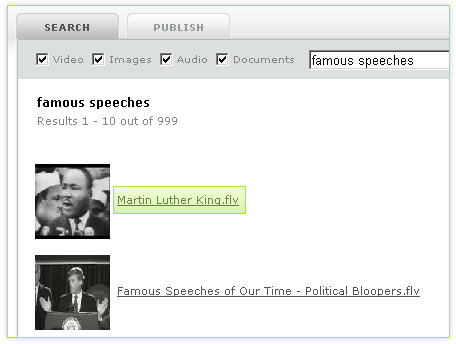
LittleShoot is:
- Easy File Sharing in your Browser
- Streaming P2P Downloads
- Searches of YouTube, BitTorrent, LimeWire, Flickr, and More
- BitTorrent Downloads in your Browser
- Open Source
To get started, download and install LittleShoot using the button below.
Help
How do I run LittleShoot once I've installed it?
Are there other places I can get help with LittleShoot?
Does LittleShoot always run in the background on my computer?
Is LittleShoot legal?
Where does LittleShoot store files it downloads?
I'm not getting any results from LimeWire. Why?
Is LittleShoot secure?
Does LittleShoot work on Opera?
Does LittleShoot work on Linux?
How do I remove LittleShoot on OSX?
How do I remove LittleShoot on Windows?
Can I control LittleShoot from the system tray on Windows?
How do I stop LittleShoot once it's running on OSX?
How do I change my download folder/directory?
Does LittleShoot stop downloading when I close my browser window?
I love LittleShoot. How can I help?
Q) How do I run LittleShoot once I've installed it?
LittleShoot is a browser plugin, so it works entirely in conjunction with the browser. So, to use LittleShoot, you just go to http://www.littleshoot.org! You can use it to search, publish, and download here on LittleShoot site itself, and LittleShoot will also automatically handle BitTorrent links from most BitTorrent sites for you. Ultimately any site will be able to include the LittleShoot plugin to take advantage of p2p services, so LittleShoot will run from many sites around the Internet.
Q) Are there other places I can get help with LittleShoot?
The LittleShoot forum is a great place to ask questions and interact with other LittleShooters.
Q) Does LittleShoot always run in the background on my computer?
No. As of the 0.90 beta releases and above, LittleShoot only runs when a web page loads the LittleShoot browser plugin, exactly like web pages load other plugins like Flash or QuickTime. That way, LittleShoot doesn't take up resources on your computer when you don't need it. The only difference with LittleShoot is that it keeps downloading your files even after you close the web page. You can always close LittleShoot using the LittleShoot status menu item in the top right on OSX and the system tray on Windows, however. That way you can make sure LittleShoot stops using any system resources at your discretion.
Q) Is LittleShoot legal?
The short answer is yes. The long answer is more involved. First and foremost, LittleShoot is not a tool for distributing copyrighted content. If you don't own the copyright to a file or are unsure of the copyright restrictions on a file, you shouldn't publish it, and you shouldn't download it. LittleShoot adheres to copyright law and something you may have heard of called the "Digital Millennium Copyright Act," or the "DMCA." Under the DMCA, a copyright holder can ask us to take down links to files they own the copyright to. When we receive valid takedown notices, we will remove the content in question. Also, if we see a file on the network we know our users don't own the copyright to, we'll remove it from the system as soon as we're aware of it. Finally, we just don't think that's a particularly interesting use for the technology. We see LittleShoot as a tool to give you better access to the knowledge of the world.
Q) Where does LittleShoot store files it downloads?
Here are the download locations for the various operating systems.
Q) I'm not getting any results from LimeWire. Why?
First, there's a known issue where LimeWire can become disconnected from the network. We're working to fix this. Unfortunately, the only solution to this problem right now is to restart your computer. If you're not getting any results from LimeWire at all, this is likely the cause. If you're getting some results, but just not as many as you'd like, you may be connected poorly or to a part of the Gnutella network that does not have many files matching your search terms.
Q) Is LittleShoot secure?
We care a great deal about you're security at LittleShoot and have a robust framework for ensuring you can use LittleShoot safely. We discuss the details in the technology section under "security," but at a high level LittleShoot's servers issue temporary keys each time you want to make a request to LittleShoot from your browser, and LittleShoot only allows your computer to make calls to your LittleShoot plugin. This combination ensures that no one on your wireless network can access your LittleShoot, for example, and no other web site can try to do anything sneaky (well, they can try, but it won't work!).
Please read the technology section for details, and feel free to have a look at our open source code if you're feeling really motivated! It's a combination of calls to our Python code running on Google App Engine and the local LittleShoot client (see LocalHostFilter.java, for example, and SignedRelayController.java).
Q) Does LittleShoot work on Opera?
There's a bug with Opera running the LittleShoot Flash detector at this time. We love Opera and should have this fixed soon, though, and we apologize for the inconvenience.
Q) Does LittleShoot work on Linux?
The latest betas have unfortunately become so complex to build that we're sad to say we've temporarily dropped Linux support. We love Linux and are determined to bring it back, however, so stay tuned.
Q) How do I remove LittleShoot on OSX?
Removing LittleShoot on OSX is relatively simple. While we've removed our uninstaller for now, you can simply do the following to uninstall LittleShoot:
Q) How do I remove LittleShoot on Windows?
You can uninstall LittleShoot on Windows in the usual "Add/Remove Programs" window on XP and "Programs and Features" window on Vista. Both reside in your control panel, and you simply double click on the LittleShoot entry.
Q) Can I control LittleShoot from the system tray on Windows?
Yes. We've added system tray support to allow you to stop LittleShoot at any time or to open your downloads.
Q) How do I stop LittleShoot once it's running on OSX?
You can control LittleShoot using the LittleShoot icon in your status bar in the top right corner of your screen. This allows you to stop LittleShoot or open your downloads. It only works on Leopard with Intel Core 2 Duo Macs or above, however. LittleShoot will still run with older Macs, but you won't be able to control it from the status bar. You can always stop it in Activity Monitor if you really need to, however.
Q) How do I change my download folder/directory?
You can change your download folder from the system tray on Windows and the status menu on OSX (the top-right corner of your screen). This unfortunately only works for computers with Java 6 on OSX, so computers that have run software update and are Intel Core 2 Duos or above (64-bit processors).
Q) Does LittleShoot stop downloading when I close my browser window?
No. LittleShoot continues downloading in the background until you explicitly tell it not to from the system tray on Windows or the status menu on OSX. You can also always bring up your downloads tab using the same menu to check the progress of your downloads.
Q) I love LittleShoot. How can I help?
Glad you asked! We're working hard with minimal resources over here, and we need all the help we can get. Any of the following help tremendously:
Are there other places I can get help with LittleShoot?
Does LittleShoot always run in the background on my computer?
Is LittleShoot legal?
Where does LittleShoot store files it downloads?
I'm not getting any results from LimeWire. Why?
Is LittleShoot secure?
Does LittleShoot work on Opera?
Does LittleShoot work on Linux?
How do I remove LittleShoot on OSX?
How do I remove LittleShoot on Windows?
Can I control LittleShoot from the system tray on Windows?
How do I stop LittleShoot once it's running on OSX?
How do I change my download folder/directory?
Does LittleShoot stop downloading when I close my browser window?
I love LittleShoot. How can I help?
Q) How do I run LittleShoot once I've installed it?
LittleShoot is a browser plugin, so it works entirely in conjunction with the browser. So, to use LittleShoot, you just go to http://www.littleshoot.org! You can use it to search, publish, and download here on LittleShoot site itself, and LittleShoot will also automatically handle BitTorrent links from most BitTorrent sites for you. Ultimately any site will be able to include the LittleShoot plugin to take advantage of p2p services, so LittleShoot will run from many sites around the Internet.
Q) Are there other places I can get help with LittleShoot?
The LittleShoot forum is a great place to ask questions and interact with other LittleShooters.
Q) Does LittleShoot always run in the background on my computer?
No. As of the 0.90 beta releases and above, LittleShoot only runs when a web page loads the LittleShoot browser plugin, exactly like web pages load other plugins like Flash or QuickTime. That way, LittleShoot doesn't take up resources on your computer when you don't need it. The only difference with LittleShoot is that it keeps downloading your files even after you close the web page. You can always close LittleShoot using the LittleShoot status menu item in the top right on OSX and the system tray on Windows, however. That way you can make sure LittleShoot stops using any system resources at your discretion.
Q) Is LittleShoot legal?
The short answer is yes. The long answer is more involved. First and foremost, LittleShoot is not a tool for distributing copyrighted content. If you don't own the copyright to a file or are unsure of the copyright restrictions on a file, you shouldn't publish it, and you shouldn't download it. LittleShoot adheres to copyright law and something you may have heard of called the "Digital Millennium Copyright Act," or the "DMCA." Under the DMCA, a copyright holder can ask us to take down links to files they own the copyright to. When we receive valid takedown notices, we will remove the content in question. Also, if we see a file on the network we know our users don't own the copyright to, we'll remove it from the system as soon as we're aware of it. Finally, we just don't think that's a particularly interesting use for the technology. We see LittleShoot as a tool to give you better access to the knowledge of the world.
Q) Where does LittleShoot store files it downloads?
Here are the download locations for the various operating systems.
- OS X: /Users/your_user_name/shared/downloads
- Windows: c:/Users/your_user_name/shared/downloads
- Linux: ~/shared/downloads
Q) I'm not getting any results from LimeWire. Why?
First, there's a known issue where LimeWire can become disconnected from the network. We're working to fix this. Unfortunately, the only solution to this problem right now is to restart your computer. If you're not getting any results from LimeWire at all, this is likely the cause. If you're getting some results, but just not as many as you'd like, you may be connected poorly or to a part of the Gnutella network that does not have many files matching your search terms.
Q) Is LittleShoot secure?
We care a great deal about you're security at LittleShoot and have a robust framework for ensuring you can use LittleShoot safely. We discuss the details in the technology section under "security," but at a high level LittleShoot's servers issue temporary keys each time you want to make a request to LittleShoot from your browser, and LittleShoot only allows your computer to make calls to your LittleShoot plugin. This combination ensures that no one on your wireless network can access your LittleShoot, for example, and no other web site can try to do anything sneaky (well, they can try, but it won't work!).
Please read the technology section for details, and feel free to have a look at our open source code if you're feeling really motivated! It's a combination of calls to our Python code running on Google App Engine and the local LittleShoot client (see LocalHostFilter.java, for example, and SignedRelayController.java).
Q) Does LittleShoot work on Opera?
There's a bug with Opera running the LittleShoot Flash detector at this time. We love Opera and should have this fixed soon, though, and we apologize for the inconvenience.
Q) Does LittleShoot work on Linux?
The latest betas have unfortunately become so complex to build that we're sad to say we've temporarily dropped Linux support. We love Linux and are determined to bring it back, however, so stay tuned.
Q) How do I remove LittleShoot on OSX?
Removing LittleShoot on OSX is relatively simple. While we've removed our uninstaller for now, you can simply do the following to uninstall LittleShoot:
- Delete /Applications/LittleShoot
- Delete /Library/Internet Plug-Ins/LittleShootPlugIn.plugin
- Delete /Library/Application Support/LittleShoot
Q) How do I remove LittleShoot on Windows?
You can uninstall LittleShoot on Windows in the usual "Add/Remove Programs" window on XP and "Programs and Features" window on Vista. Both reside in your control panel, and you simply double click on the LittleShoot entry.
Q) Can I control LittleShoot from the system tray on Windows?
Yes. We've added system tray support to allow you to stop LittleShoot at any time or to open your downloads.
Q) How do I stop LittleShoot once it's running on OSX?
You can control LittleShoot using the LittleShoot icon in your status bar in the top right corner of your screen. This allows you to stop LittleShoot or open your downloads. It only works on Leopard with Intel Core 2 Duo Macs or above, however. LittleShoot will still run with older Macs, but you won't be able to control it from the status bar. You can always stop it in Activity Monitor if you really need to, however.
Q) How do I change my download folder/directory?
You can change your download folder from the system tray on Windows and the status menu on OSX (the top-right corner of your screen). This unfortunately only works for computers with Java 6 on OSX, so computers that have run software update and are Intel Core 2 Duos or above (64-bit processors).
Q) Does LittleShoot stop downloading when I close my browser window?
No. LittleShoot continues downloading in the background until you explicitly tell it not to from the system tray on Windows or the status menu on OSX. You can also always bring up your downloads tab using the same menu to check the progress of your downloads.
Q) I love LittleShoot. How can I help?
Glad you asked! We're working hard with minimal resources over here, and we need all the help we can get. Any of the following help tremendously:
- Telling us as soon as you notice a bug or think of an improvement we could make on the forum or directly using the feedback e-mail (at littleshoot.org).
- Use the links in the download page to send links to friends, Twitter followers, etc.
- Use the "Add This" links within LittleShoot to post about it on social networks, Digg, Reddit, StumbleUpon, etc.
- Blog About Us
- Twitter About Us
- If you're a programmer, fix bugs in the open source code.